MCP Servers
MCP là thứ biến AI từ "biết nhiều" thành "làm được nhiều" — nó cho phép AI agent kết nối với thế giới bên ngoài một cách có chuẩn.
Vấn đề MCP giải quyết
Trước MCP, mỗi tool AI muốn kết nối với service ngoài (GitHub, Slack, database...) phải tự viết integration riêng. Không có chuẩn chung. Kết quả là mỗi tool hỗ trợ một tập service khác nhau, không tương thích.
MCP (Model Context Protocol) là open standard do Anthropic tạo ra — định nghĩa một ngôn ngữ chung để AI agent giao tiếp với bất kỳ external tool nào. Ai muốn expose tool cho AI thì viết MCP server theo chuẩn này, AI client nào hỗ trợ MCP thì dùng được ngay.---
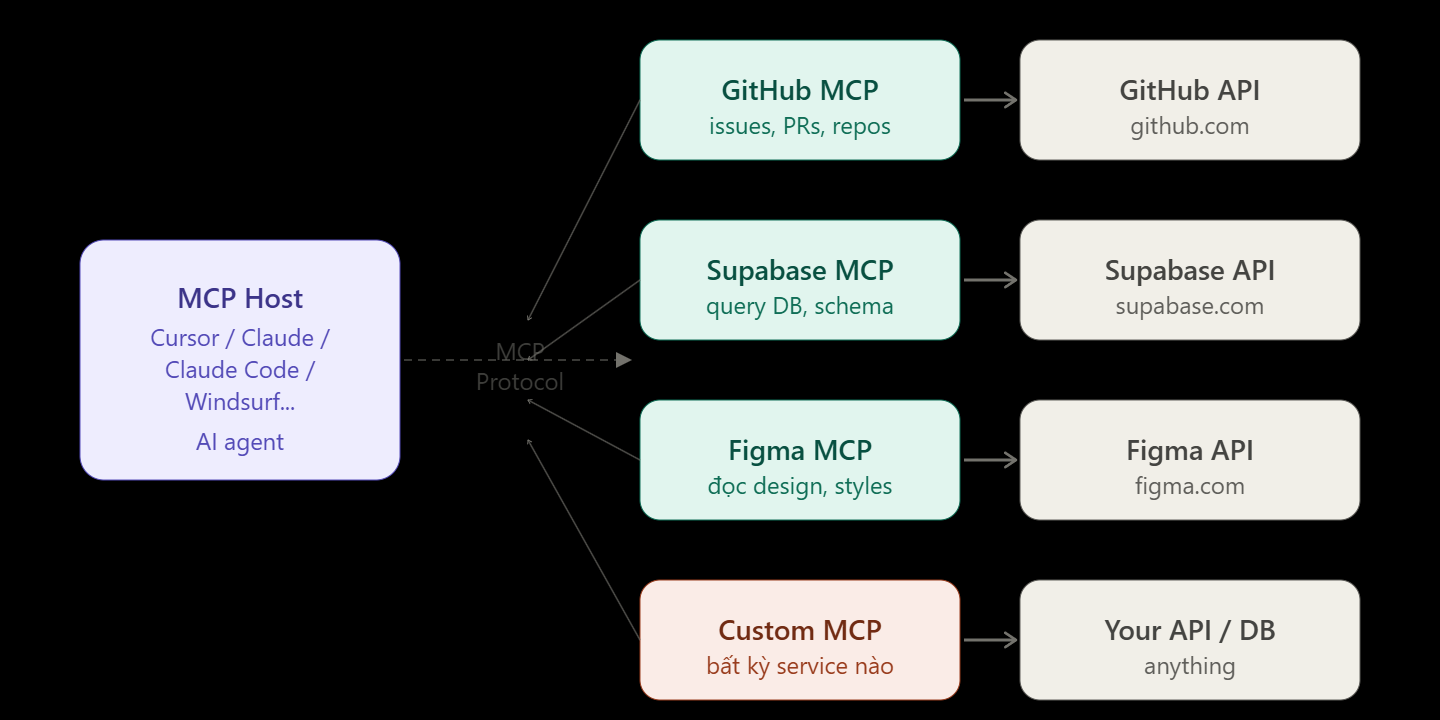
Cách MCP hoạt động thực tế
Mỗi MCP server expose một tập "tools" — các function AI có thể gọi. Ví dụ GitHub MCP expose tools như create_issue, list_pull_requests, get_file_contents. Khi bạn prompt Cursor "tạo GitHub issue cho bug vừa fix", Cursor biết nó có tool create_issue, tự điền params, gọi, và báo kết quả.
Bạn không cần copy link, không cần mở browser, không cần paste — AI làm trực tiếp.
Tích hợp vào Cursor
Cursor đọc config MCP từ file ~/.cursor/mcp.json (global) hoặc .cursor/mcp.json trong project (local). Format:
{
  "mcpServers": {
    "github": {
      "command": "npx",
      "args": ["-y", "@modelcontextprotocol/server-github"],
      "env": {
        "GITHUB_PERSONAL_ACCESS_TOKEN": "ghp_xxxx"
      }
    },
    "supabase": {
      "command": "npx",
      "args": ["-y", "@supabase/mcp-server-supabase@latest",
               "--supabase-url", "https://xxx.supabase.co",
               "--supabase-service-role-key", "eyJ..."]
    }
  }
}
Sau khi save file, restart Cursor. Vào Settings → MCP để xem server nào đang active. Trong Agent mode, AI tự detect và dùng tools từ các server này khi cần.
Tích hợp vào Claude Desktop
Claude Desktop dùng file config tại:
- macOS:
~/Library/Application Support/Claude/claude_desktop_config.json - Windows:
%APPDATA%\Claude\claude_desktop_config.json
Format tương tự Cursor:
{
  "mcpServers": {
    "filesystem": {
      "command": "npx",
      "args": ["-y", "@modelcontextprotocol/server-filesystem",
               "/Users/yourname/projects"]
    },
    "github": {
      "command": "npx",
      "args": ["-y", "@modelcontextprotocol/server-github"],
      "env": {
        "GITHUB_PERSONAL_ACCESS_TOKEN": "ghp_xxxx"
      }
    }
  }
}
Restart Claude Desktop, icon MCP xuất hiện trong chat — bạn có thể thấy tools nào đang available.
Những MCP server phổ biến nhất cho vibe coding
@modelcontextprotocol/server-github — tạo issue, đọc PR, browse code trên GitHub thẳng từ chat.
@supabase/mcp-server-supabase — AI đọc schema database của bạn, query data, tạo migration. Đặc biệt hữu ích để AI hiểu đúng structure trước khi generate code.
@modelcontextprotocol/server-filesystem — AI đọc/ghi file ngoài project hiện tại, hữu ích khi làm việc với nhiều repo.
@modelcontextprotocol/server-postgres — connect thẳng vào Postgres, AI có thể chạy query và đọc schema.
mcp-figma — AI đọc được Figma file, biết màu sắc, font, component name — generate code khớp với design.
@modelcontextprotocol/server-slack — AI đọc channel, tóm tắt discussion, post message.
Use case thực tế kết hợp nhiều MCP
Trong Cursor Agent với GitHub MCP + Supabase MCP:

"Đọc issue #142 trên GitHub, hiểu yêu cầu,
xem schema bảng products trong Supabase,
rồi implement feature đó"
Agent tự: gọi GitHub MCP đọc issue → gọi Supabase MCP xem schema → viết code phù hợp → tạo PR. Bạn ngồi xem.
Tự viết MCP server
Nếu có internal tool hoặc API riêng, bạn có thể viết MCP server trong ~50 dòng TypeScript:
import { Server } from "@modelcontextprotocol/sdk/server/index.js"

const server = new Server({ name: "my-tool", version: "1.0.0" })

server.setRequestHandler("tools/list", async () => ({
  tools: [{
    name: "get_customer",
    description: "Lấy thông tin khách hàng theo ID",
    inputSchema: {
      type: "object",
      properties: { id: { type: "string" } }
    }
  }]
}))

server.setRequestHandler("tools/call", async (req) => {
  const customer = await db.customers.findById(req.params.arguments.id)
  return { content: [{ type: "text", text: JSON.stringify(customer) }] }
})
Sau đó add vào config như các server khác. AI của bạn giờ có thể query customer database bằng ngôn ngữ tự nhiên.